Showing posts with label Internet. Show all posts

Thursday, September 01, 2011

Using Gmail, Calendar and Docs without an Internet connection

The great thing about web apps is that you can access all of your information on the go, and we’ve introduced ways to use Google Apps on a variety of devices like mobile phones and tablets. But it’s inevitable that you’ll occasionally find yourself in situations when you don’t have an Internet connection, like planes, trains and carpools. When we announced Chromebooks at Google I/O 2011, we talked about bringing offline access to our web apps, and now we’re taking our first steps in that direction. Gmail offline will be available today, and offline for Google Calendar and Google Docs will be rolling out over the next week, starting today.

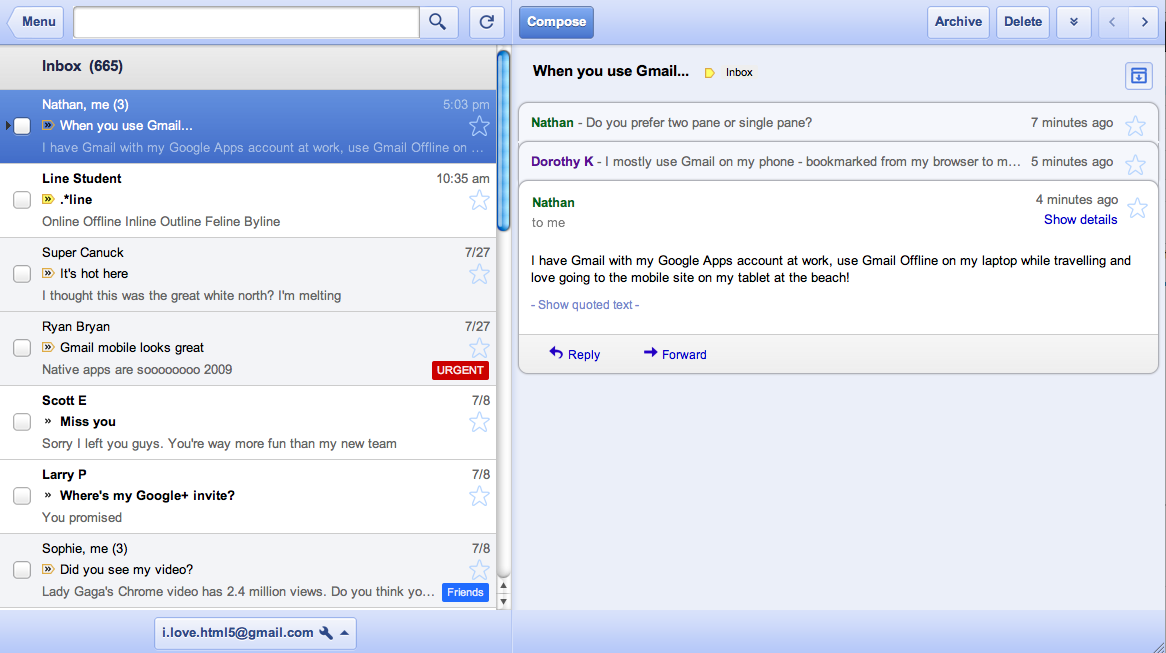
Gmail Offline is a Chrome Web Store app that’s intended for situations when you need to read, respond to, organize and archive email without an internet connection. This HTML5-powered app is based on the Gmail web app for tablets, which was built to function with or without web access. After you install the Gmail Offline app from the Chrome Web Store, you can continue using Gmail when you lose your connection by clicking the Gmail Offline icon on Chrome’s “new tab” page.

Google Calendar and Google Docs let you seamlessly transition between on- and offline modes. When you’re offline in Google Calendar, you can view events from your calendars and RSVP to appointments. With Google Docs you can view documents and spreadsheets when you don’t have a connection. Offline editing isn’t ready yet, but we know it’s important to many of you, and we’re working hard to make it a reality. To get started using Google Calendar or Google Docs offline, just click the gear icon at the top right corner of the web app and select the option for offline access.

IT administrators can deploy Chrome Web Store apps to users en masse by setting uporganizational policies for Chrome.

Today’s world doesn’t slow down when you’re offline and it’s a great feeling to be productive from anywhere, on any device, at any time. We’re pushing the boundaries of modern browsers to make this possible, and while we hope that many users will already find today’s offline functionality useful, this is only the beginning. Support for offline document editing and customizing the amount of email to be synchronized will be coming in the future. We also look forward to making offline access more widely available when other browsers support advanced functionality (like background pages).

Monday, June 06, 2011

5 Google Reader Themes for Sheer Awesomeness

5 Google Reader Themes for Sheer Awesomeness


Google Reader, the online feed viewer is one of the most used application from the Google factory. Unfortunately, it has only one default theme and there are no options to customize it with backgrounds and colors like in Gmail. However, there is ahidden easter egg, which changes your sidebar style. Officially Google doesn’t provide custom themes but you can use third party tools to beautify your GReader.
Let us look at 5 awesome Google Reader themes that will not only decorate but alsosimplify your reading experience and enhance the productive time spent.
Note: Since by default Google gives no themes, we will use third party addons and scripts that will work only for the machine they are installed. To use on other browsers/computers we will have to install them again.

1. Feedly – Do more in addition to styling

feedly style
Our first choice is Feedly which is actually a web app wrapper over Google Reader. In simple terms, Feedly not only prettify your Google reader but also provide bunch of additional features and widgets for Facebook, Twitter, YouTube and Flickr.
The favorable first position of this theme comes from the magazine like view that gives comfortable and fast reading experience. Essentially Feedly provides 4 views to choose namely: Titles and Summary, Titles Only, Grid and Entire Content Inlined.
Another pro for using feedly is the consistency across multiple devices. Feedly is available as an addon for firefox, Chrome, Safari browsers and for iPhone, iPad and Android phones and tablets. So no matter you are using cell phone or laptop, you will have similar experience everywhere.

Sunday, May 22, 2011

7 Google Features Only Available in Google Chrome


7 Google Features Only Available in Google Chrome

Google Chrome is at the forefront of the new technologies and Google services are the first to use them. Here are some examples of features only available in Google Chrome:


1. Native printing in Google Docs. You no longer have to download PDF files and use Adobe Reader or a similar PDF reader to print documents. Google implemented a W3C working draft from 2006.


2. Uploading folders in Google Docs. While you can install a Java applet in other browsers to upload folders, Chrome is the only browser that supports this feature natively.

Thursday, May 19, 2011

10 Ways to Find Blogs You'll Love


10 Ways to Find Blogs You’ll Love

The Content Exploration Series is presented by Mashable Explore, a new way to discover resources and information on your favorite Mashable topics. Mashable Explore is brought to you by the all-new, 100% reinvented 2011 Ford Explorer. Drive One.
Every now and then, we all get stumped when looking for a good online read.
Whether your feeds need a refresh, you’re delving into a new topic, or you’re just new to this whole “blog reading” thing, we’ve got you covered. There are dozens of services on the web dedicated to helping you get the most out of the universe of regularly updated blogs, and many of them are focused on helping you find the most high quality content as well as the content most relevant to you.
As an added bonus for the aesthetes out there, some of them are also an absolute pleasure to consume from a design perspective.
Here are ten tools we like to use to get out of a blog reading rut. In the comments, do share your tips and tricks with us and other Mashable readers.

Blog Directories


First, take a look at these encyclopedic catalogs of blogs. You’ll be able to browse or search by topic, so you’ll find the content and bloggers you’re looking for.

1. Alltop

Alltop is the granddaddy of all blog discovery tools. The site, which was cofounded in 2008 by Silicon Valley person of interest Guy Kawasaki, is known for its tight, topic-based groupings of the creme de la creme of blogs and a handful of other informative sites.

Wednesday, May 18, 2011

New in Gmail Labs: Smart Labels - Official Gmail Blog


New in Gmail Labs: Smart Labels

Wednesday, March 09, 2011 | 10:00 AM


People get a lot of email these days. On top of personal messages, there are group mailing lists, social network notifications, credit card statements, newsletters you might have signed up for, and promotional email from a shopping site you used once months ago. Gmail’s filters and labelswere invented to help manage the deluge, but while I have about 100 filters that triage and label my incoming mail, most of my friends and family have all their messages in a giant unfiltered inbox.

Last year, we launched Priority Inbox to automatically sort incoming email and help you focus on the messages that matter most. Today, we're launching a complementary feature in Gmail Labs called Smart Labels, which helps you classify and organize your email. Once you turn it on from theLabs tab in Settings, Smart Labels automatically categorizes incoming Bulk, Notification and Forum messages, and labels them as such. “Bulk” mail includes any kind of mass mailing (such as newsletters and promotional email) and gets filtered out of your inbox by default (where you can easily read it later), “Notifications” are messages sent to you directly (like account statements and receipts), and email from group mailing lists gets labeled as “Forums.”


Summarize your data with pivot tables - Docs Blog


Summarize your data with pivot tables

Tuesday, May 17, 2011
Labels: , ,
Starting today, we're rolling out pivot tables in Google spreadsheets. Pivot tables make it easy to process and summarize large data sets in seconds. Check out the video below for a look at how pivot tables work in Google spreadsheets:

New in Labs: Background Send - Official Gmail Blog


New in Labs: Background Send

Monday, April 25, 2011 | 3:22 PM


We’re always looking for ways to make Gmail faster. One of the most common delays happens after you hit that “Send” button, when you’re waiting patiently for a couple seconds for Gmail to send your message. If you send a lot of email, that can add up to a lot of lost time.

To help give you that time back, there’s a new feature in Gmail Labs called Background Send. Once you turn it on from the Labs tab in Settings, you can get on with what you’re doing while Gmail quietly sends off your mail in the background. You can keep reading your inbox, compose new messages, chat with people — all the things you’d usually do. You can even send more than one message in the background at the same time.

Store up to 25,000 contacts - Official Gmail Blog


Store up to 25,000 contacts
Wednesday, May 04, 2011 | 9:29 AM


Gmail used to have a limit of 10,000 contacts. For most of us, this was way more than enough, but we heard from some of you who use Gmail to communicate with more than 10,000 people. We want you to be able to store all of your contacts in a single place, so starting today, we’ve increased the limit for all Gmail users, including all those of you who use Google Apps, to 25,000 contacts.

Wednesday, May 11, 2011

إحصائيات، حقائق وأرقام عن يوتيوب


إحصائيات، حقائق وأرقام عن يوتيوب:

3 هو ترتيب الموقع على مستوى العالم حسب إحصائيات اليكسا بعد موقعي جوجل وفيس بوك.
13 مليون هي عدد الساعات التي تم رفعها على الموقع خلال عام 2010.
35 هي عدد الساعات من مقاطع الفيديو التي يتم رفعها كل دقيقة على الموقع.
700 مليار هي عدد مشاهدات مقاطع الفيديو على الموقع في عام 2010 وحده.
100 مليون هي عدد مشاهدات مقاطع الفيديو عن طريق الهواتف يومياً.
50 مليون هي عدد الضغطات على الصفحة الرئيسية للموقع كل يوم.
70% هي نسبة مستخدمي الموقع من خارج الولايات المتحدة الأمريكية.

Microsoft Buys Skype in $8.5 Billion Cash Deal - Yahoo! Finance


Microsoft Buys Skype in $8.5 Billion Cash Deal

Video Player Controls


Big news today in the tech sector.
Microsoft announced an $8.5 billion acquisition of the Internet telephone service Skype Technologies SA from eBay and a group of private equity investors including Silicon Valley heavyweights Silver Lake Partners. The deal is Microsoft's largest cash purchase in its 36-year long history.

Sunday, January 23, 2011

10 Skills Required in Every Blogger – Is Blogging For You? | OMG EUREKA


ask yourselfIt always feels good when you get to know that what ever information you are sharing with others are appreciated by them and your content is viewed by thousands of people and they are taking advantage of it. These all things makes you really feel good. But how this information should be available to others, this has to be well planned and a thorough study is required. I know that blogging is really a nice way to make your presence available at Internet but what are your targets, how long you are going to do that, what are your expectations and many other things are their which comes in mind before you start anything.

However, their are few important skills which every user who is interested in blogging should consider and analyze by asking these things to himself. if you want to make your content available on the web, blogging is not the only solution to it. There are other platforms available to you which you can use like forums, website etc
It depends what are your needs and how you want your information should be available to others. But to become a successful blogger, these 10 skills atleast should be available in a blogger.

1. The Biggest and The Most Important Skill For Bloggers – Writing Habbit
If you want to be a blogger or should i say a good blogger, then you should enjoy writing. Because blogs are required to be updated periodically. And for successful blogging, you have to write more than 1 article daily. If you don’t like writing, then blogging is not for you. You have to reply to your viewers emails, comments, tweets etc. Hence writing is the core thing of blogging which should be in your blood.


كمبيوتر واتصالات - التواصل عبر الإنترنت شكل جديد من أشكال الجنون الحديثة

دراسة أمريكية حديثة تؤكد أن الطريقة المحمومة للناس في التواصل عبر الإنترنت من خلال شبكات التواصل الاجتماعي التويتر والـ"فيس بوك" تعد شكلاً جديداً من أشكال الجنون الحديثة

http://www.moheet.com/show_news.aspx?nid=444555&pg=10
Wael Guirguis
Sent using BlackBerry®

Wednesday, January 19, 2011

Official Google Blog: Call phones from Gmail


Call phones from Gmail


Gmail voice and video chat makes it easy to stay in touch with friends and family using your computer’s microphone and speakers. But until now, this required both people to be at their computers, signed into Gmail at the same time. Given that most of us don’t spend all day in front of our computers, we thought, “wouldn’t it be nice if you could call people directly on their phones?”


Starting today, you can call any phone right from Gmail.


Calls to the U.S. and Canada will be free for at least the rest of the year and calls to other countries will be billed at our very low rates. We worked hard to make these rates really cheap (see comparison table) with calls to the U.K., France, Germany, China, Japan—and many more countries—for as little as $0.02 per minute.

Thursday, January 13, 2011

How Google dominates the Web

GoogleGoogle began strictly as a search company, and it’s still their bread and butter. However, as the company has grown, it’s spread its tentacles like a giant octopus out to most parts of the Web. A benevolent giant octopus, providing lots of highly useful services, but a giant nonetheless. Try surfing the Web without touching a single Google service. It’s impossible.

Google even shows up in places you’d never expect it to. For example, you know those “captchas” that websites and online forums use to verify that you’re human? Google bought reCAPTCHA in 2009 and is currently using the captcha input from hundreds of millions of users to improve its text recognition software.

But that’s just a tiny little service. Let’s see where Google has a more dominant presence, starting with, but not ending with, search.

Is Goo.gl really the fastest URL shortener? (chart)

Goo.gl versus other URL shorteners

A few weeks ago, Google made its URL shortener, Goo.gl, open for everyone and gave it its own website, similar to Bit.ly’s. Previously, Goo.gl could only be used by Google’s own services.

When they announced this, Google made a pretty bold statement: “… we do want it to be the stablest, most secure, and fastest URL shortener on the web.”

That’s something that we should test, isn’t it?

So, for a couple of weeks after Goo.gl became open, we monitored its performance and reliability together with several other URL shortening services, including Bit.ly and TinyURL. We used, of course, our own monitoring service (i.e. Pingdom).

Internet 2010 in numbers

Internet 2010 in numbers

What happened with the Internet in 2010?

How many websites were added? How many emails were sent? How many Internet users were there? This post will answer all of those questions and many, many more. If it’s stats you want, you’ve come to the right place.

We used a wide variety of sources from around the Web to put this post together. You can find the full list of source references at the bottom of the post if you’re interested. We here at Pingdom also did some additional calculations to get you even more numbers to chew on.

Prepare for a good kind of information overload. ;)

Email


  • 107 trillion – The number of emails sent on the Internet in 2010.
  • 294 billion – Average number of email messages per day.
  • 1.88 billion – The number of email users worldwide.
  • 480 million – New email users since the year before.
  • 89.1% – The share of emails that were spam.
  • 262 billion – The number of spam emails per day (assuming 89% are spam).
  • 2.9 billion – The number of email accounts worldwide.
  • 25% – Share of email accounts that are corporate.